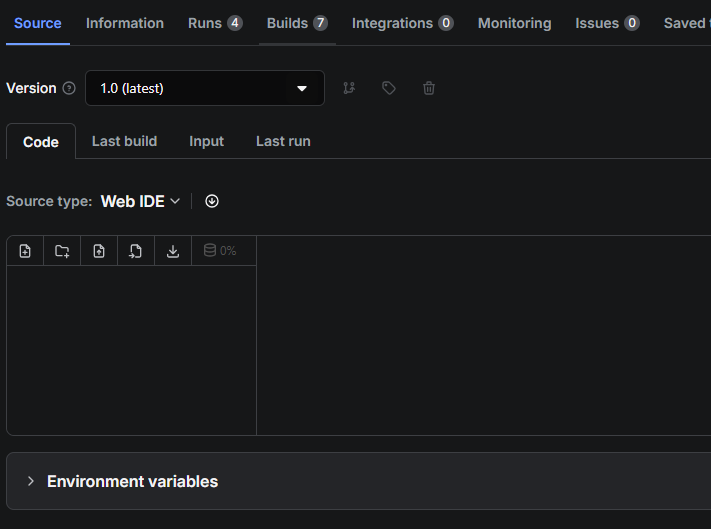
Why is no code showing in the web IDE?
📚Documentation General🖥️Platform
General🖥️PlatformAnyone know why my code is not showing in the web IDE? I've adjusted the Dockerfile, so that might be why. What should I change?
# Specify the base Docker image. You can read more about
# the available images at https://crawlee.dev/docs/guides/docker-images
# Using actor-node-playwright-chrome which is Debian-based (glibc) for onnxruntime-node compatibility
FROM apify/actor-node-playwright-chrome:22-1.54.1 AS builder

# Check preinstalled packages
RUN npm ls crawlee apify puppeteer playwright

# Copy just package.json and package-lock.json
# to speed up the build using Docker layer cache.
COPY --chown=myuser:myuser package*.json ./

# Install all dependencies. Don't audit to speed up the installation.
RUN npm install --include=dev --audit=false

# Next, copy the source files using the user set
# in the base image.
COPY --chown=myuser:myuser . ./

# Install all dependencies and build the project.
# Don't audit to speed up the installation.
RUN npm run build

# Create final image - using Playwright image for glibc (required by onnxruntime-node)
FROM apify/actor-node-playwright-chrome:22-1.54.1

# Check preinstalled packages
RUN npm ls crawlee apify puppeteer playwright

# Copy just package.json and package-lock.json
# to speed up the build using Docker layer cache.
COPY --chown=myuser:myuser package*.json ./

# Install NPM packages, skip optional and development dependencies
RUN npm --quiet set progress=false \
    && npm install --omit=dev \
    && echo "Installed NPM packages:" \
    && (npm list --omit=dev --all || true) \
    && echo "Node.js version:" \
    && node --version \
    && echo "NPM version:" \
    && npm --version \
    && rm -r ~/.npm

# Copy built JS files from builder image
COPY --from=builder --chown=myuser:myuser /home/myuser/dist ./dist

# Next, copy the remaining files and directories with the source code.
COPY --chown=myuser:myuser . ./

# Run the image.
CMD npm run start:prod --silent
# Specify the base Docker image. You can read more about
# the available images at https://crawlee.dev/docs/guides/docker-images
# Using actor-node-playwright-chrome which is Debian-based (glibc) for onnxruntime-node compatibility
FROM apify/actor-node-playwright-chrome:22-1.54.1 AS builder
# Check preinstalled packages
RUN npm ls crawlee apify puppeteer playwright
# Copy just package.json and package-lock.json
# to speed up the build using Docker layer cache.
COPY --chown=myuser:myuser package*.json ./
# Install all dependencies. Don't audit to speed up the installation.
RUN npm install --include=dev --audit=false
# Next, copy the source files using the user set
# in the base image.
COPY --chown=myuser:myuser . ./
# Install all dependencies and build the project.
# Don't audit to speed up the installation.
RUN npm run build
# Create final image - using Playwright image for glibc (required by onnxruntime-node)
FROM apify/actor-node-playwright-chrome:22-1.54.1
# Check preinstalled packages
RUN npm ls crawlee apify puppeteer playwright
# Copy just package.json and package-lock.json
# to speed up the build using Docker layer cache.
COPY --chown=myuser:myuser package*.json ./
# Install NPM packages, skip optional and development dependencies
RUN npm --quiet set progress=false \
&& npm install --omit=dev \
&& echo "Installed NPM packages:" \
&& (npm list --omit=dev --all || true) \
&& echo "Node.js version:" \
&& node --version \
&& echo "NPM version:" \
&& npm --version \
&& rm -r ~/.npm
# Copy built JS files from builder image
COPY --from=builder --chown=myuser:myuser /home/myuser/dist ./dist
# Next, copy the remaining files and directories with the source code.
COPY --chown=myuser:myuser . ./
# Run the image.
CMD npm run start:prod --silent